Last updated: 21 October 2026
You buy a product for ₹800 and sell it for ₹1,000. Your profit is ₹200, but is that 20% or 25%? Both numbers are right. 25% is the markup on your cost, and 20% is the margin on your selling price.
A profit and loss percentage calculator shows both at once. Here’s what each number means, which one to use for pricing, and how far you can cut a price before you lose money.
How to use the profit and loss percentage calculator
The calculator has two tabs for two questions.
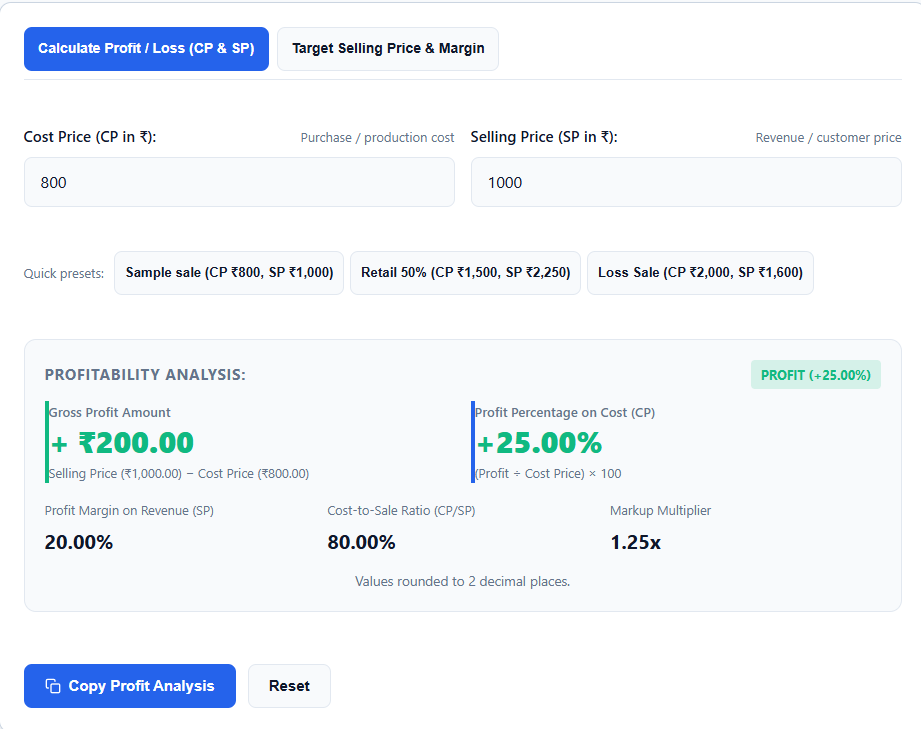
Tab 1, “Calculate Profit / Loss (CP & SP)” is for when you know your cost and your selling price. Enter a cost price of ₹800 and a selling price of ₹1,000. You get the gross profit (₹200), the profit % on cost (25%), the margin on revenue (20%), the markup multiplier (1.25x) and the cost-to-sale ratio (80%).
Tab 2, “Target Selling Price & Margin” is for when you know your cost and the profit you want. Enter the cost price and the profit %, then choose whether that % is a markup on cost or a margin on the selling price. The calculator gives you the price to charge.
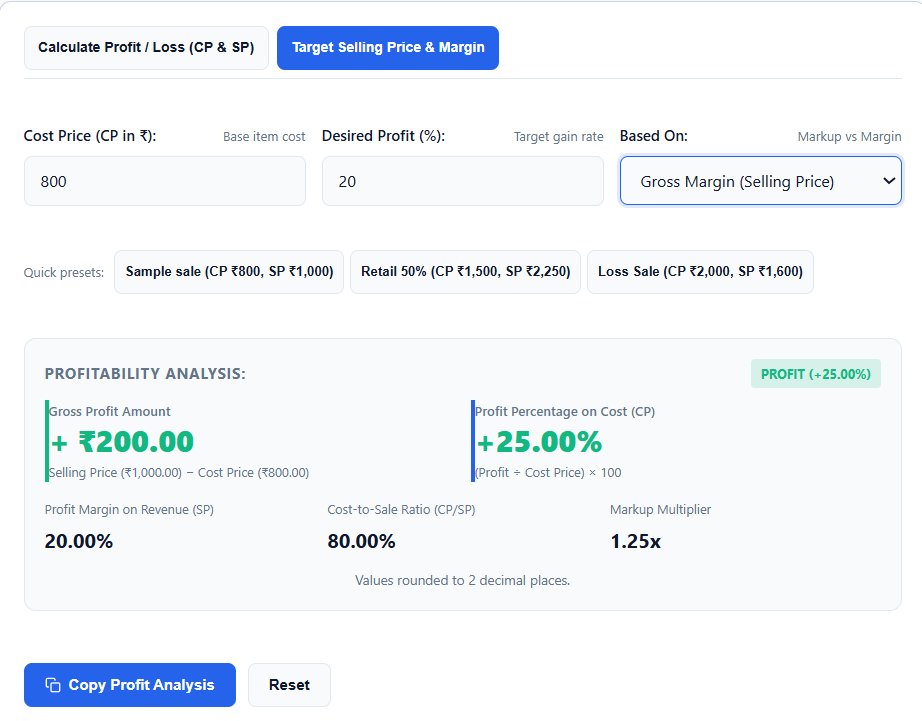
There are also one-click presets: Sample sale (CP ₹800, SP ₹1,000), Retail 50% (CP ₹1,500, SP ₹2,250) and Loss Sale (CP ₹2,000, SP ₹1,600). Copy and Reset buttons sit below the results. The calculator runs in your browser, so the numbers stay on your device.
Markup vs margin: the same profit, two percentages
Take the same example: cost ₹800, selling price ₹1,000, profit ₹200.
Markup (25%) = profit ÷ cost price × 100 = 200 ÷ 800 = 25%. This answers: “How much did I add on top of what I paid?”
Margin (20%) = profit ÷ selling price × 100 = 200 ÷ 1,000 = 20%. This answers: “Of every rupee the customer pays, how much do I keep?”
On a profitable sale, margin is always lower than markup, because the profit is divided by a bigger number.
A shopkeeper deciding a price usually thinks in markup (“I bought at 800 and want 25% on top”). When you judge how healthy a business is, margin is the more common measure (“I keep 20 paise of every rupee of sales”).
The formulas
- Profit = selling price − cost price
- Loss = cost price − selling price
- Profit % on cost (markup) = profit ÷ cost price × 100
- Margin on selling price = profit ÷ selling price × 100
- Markup multiplier = selling price ÷ cost price. A 1.25x multiplier means the price is 1.25 times the cost.
- Break-even = selling price equals cost price, with no profit and no loss
Check them with the example: 1,000 − 800 = ₹200 profit. 200 ÷ 800 × 100 = 25% markup. 200 ÷ 1,000 × 100 = 20% margin. 1,000 ÷ 800 = 1.25x.
For a loss, use the Loss Sale preset: cost ₹2,000, selling price ₹1,600. The loss is ₹400, which is 20% of the cost.
Setting a selling price from a target
This is what the “Target Selling Price & Margin” tab does. Say your cost is ₹800 and you want a 20% margin. The formula is:
Selling price = cost price ÷ (1 − margin ÷ 100) = 800 ÷ 0.80 = ₹1,000
A 20% margin needs a 25% markup. Many sellers set a “20% markup” (₹960) and believe they have a 20% margin, but their real margin is 160 ÷ 960, about 16.7%.
For a markup target, the formula is simpler: selling price = cost × (1 + markup ÷ 100). A 25% markup on ₹800 gives ₹1,000.
The same percentage gives different prices. A 25% margin on ₹800 needs 800 ÷ 0.75 = ₹1,066.67, but a 25% markup gives only ₹1,000. If you want 25% of your sales to be profit, choose “margin on selling price”.
How much discount can you give before you lose money?
The most you can discount equals your margin. On the ₹800 item priced at ₹1,000, the margin is 20%, so a 20% discount brings the price to ₹800 and your profit to zero.
- 10% off: the price is ₹900 and the profit is ₹100, half of the original ₹200
- 20% off: the price is ₹800 and the profit is ₹0
- 25% off: the price is ₹750 and you lose ₹50, which is 6.25% of the cost
Before a sale, check your margin here and then run the offer through the discount calculator. You can read how stacked offers work in the discount calculator guide.
Gross profit is not net profit
The calculator compares cost price with selling price. Real businesses have more costs: delivery, packaging, payment gateway fees, marketplace commission and returns. Your net profit is lower than the gross number.
Either subtract those costs from the profit, or add them to the cost price before you calculate. A 25% markup that looks healthy can shrink fast once a marketplace takes its commission.
GST works differently. If you’re registered, the GST you collect goes to the government and isn’t your income. If your selling price includes GST, remove it first with the reverse GST calculator, then calculate profit on the price before tax. For a bill of ₹1,180 with 18% GST, work with ₹1,000.
Everyday uses
Shopkeepers. Check the real profit % on each product instead of guessing. Products with thin margins need volume, and products with fat margins deserve shelf space.
Online resellers. Before you list on a marketplace, add the platform’s commission and shipping to your cost price, then see whether the selling price still leaves a profit.
Freelancers quoting projects. Treat your time cost as the “cost price” and the quote as the “selling price” to see your real margin.
Students. Profit and loss questions appear in the aptitude sections of exams like SSC and banking. The calculator is a quick way to check your manual answers while you practise.
Sellers planning a sale. Use the break-even discount above to set a limit before you advertise an offer.
What the calculator misses: your running costs
The calculator compares the cost price with the selling price. Your other costs stay outside it.
Take the ₹800 item sold at ₹1,000. Say a marketplace takes 10% (₹100) and shipping costs ₹60 (these are example numbers). The profit of ₹200 shrinks to ₹40. That’s 5% on cost and 4% of the selling price, not the 25% and 20% you saw at first.
Rent, wages and electricity cut it further. Add your per-order costs to the cost price before you calculate, and ask your accountant about your books.
Frequently asked questions
What is the difference between markup and margin?
Markup is profit as a percentage of the cost price. Margin is profit as a percentage of the selling price. On a ₹800 cost and a ₹1,000 sale, the markup is 25% and the margin is 20%.
How do I find the selling price for a target margin?
Divide the cost price by (1 − margin ÷ 100). For a 20% margin on a ₹800 cost, that’s 800 ÷ 0.80 = ₹1,000. The target price tab does this for you.
How much discount can I give without a loss?
Up to your margin. If your margin is 20%, a discount above 20% makes the sale a loss.
Does the calculator include GST or shipping costs?
No. It calculates on the cost and selling prices you enter. Remove GST from the selling price first, and add shipping and fees to your cost price if you want them in the result.
Author: Kailash Choudhary
Kailash Choudhary runs Mubarak4u.in from Makrana, Rajasthan. He writes practical guides for the site.