A designer sends you a color: #FF5733. Your printer asks for CMYK values. Your developer wants rgb() for CSS. You open three different tools to convert one color.
A color converter does it in one place. Type or pick a color once, and you get HEX, RGB, HSL and CMYK, plus a contrast check that shows whether white or black text will be readable on it.
What this color converter does
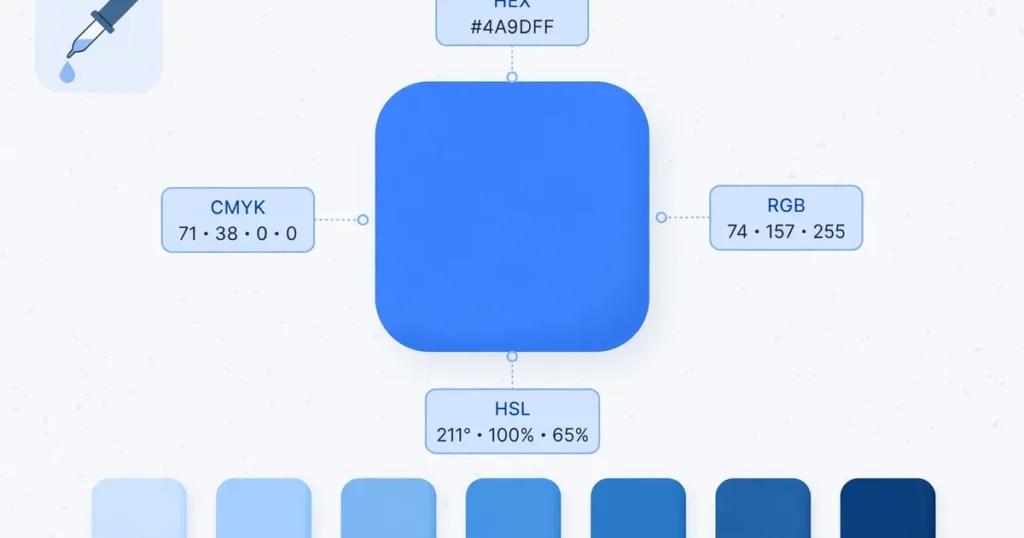
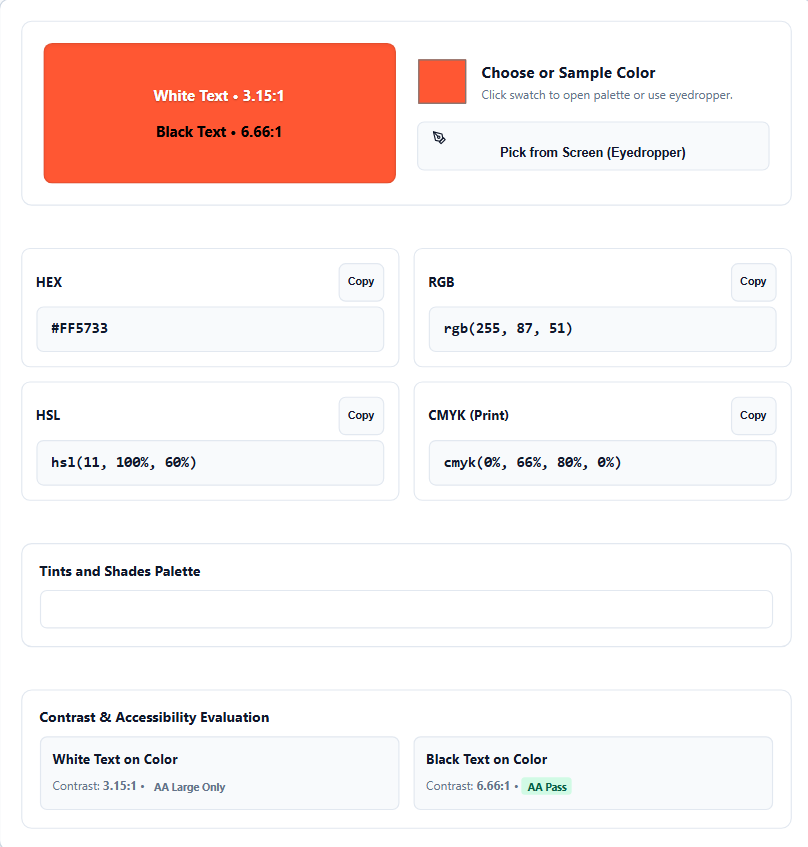
The tool shows four format boxes: HEX, RGB, HSL and CMYK (Print). Change any one of the first three, and the others update right away. There’s no convert button and no page reload.
Above the boxes, a large preview shows your color with two sample lines, white text and black text, each with its contrast ratio. Below them are a Tints and Shades Palette strip and a Contrast and Accessibility Evaluation with pass badges.
It opens with a warm orange-red, #FF5733, so you can see everything working before you touch anything.
How to use the color converter
Step 1: Pick your starting color. Click the swatch to open your browser’s palette, or type a code into the HEX, RGB or HSL box. HEX accepts the short form and the long form, such as #F53 and #FF5533.
Step 2: Use the eyedropper if you need it. On desktop browsers that support it, a “Pick from Screen (Eyedropper)” button appears. Click it, then click any pixel on your screen, such as a logo in another tab. On other browsers the button stays hidden and everything else still works.
Step 3: Read the converted values. All boxes update as you type or pick. If you type an invalid HEX code, the tool shows a short message with the correct format.
Step 4: Check the contrast cards. The preview and the evaluation section show contrast ratios for white and black text, with badges such as AA Pass or AA Large Only. Pick the text color with the better badge.
Step 5: Copy what you need. Each format box has its own Copy button. Paste the value into your CSS file, design tool or print document.
HEX, RGB, HSL and CMYK explained simply
HEX is the six-digit code used in CSS, such as #FF5733. It’s short, easy to copy and understood by every browser.
RGB writes a color as red, green and blue light values from 0 to 255. rgb(255, 87, 51) is the same orange-red. Developers use it to adjust one channel, or to add transparency with rgba().
HSL describes the hue (0 to 360 degrees), the saturation (0 to 100%) and the lightness (0 to 100%). hsl(11, 100%, 60%) reads naturally: red-orange, fully vivid, medium light. Change the lightness number to get a lighter or darker version.
CMYK is for print. It gives the percentages of cyan, magenta, yellow and black ink. For #FF5733 the converter shows cmyk(0%, 66%, 80%, 0%).
Convert HEX to RGB by hand
A HEX code is three pairs of base-16 digits. Each pair is one color channel. The digits run 0 to 9, then A to F, where A is 10 and F is 15.
To convert a pair, multiply the first digit by 16 and add the second one. Take #FF5733:
- FF = 15 × 16 + 15 = 255 (red)
- 57 = 5 × 16 + 7 = 87 (green)
- 33 = 3 × 16 + 3 = 51 (blue)
That gives rgb(255, 87, 51). To check a single pair, you can use the base converter, where FF in base 16 is 255.
The short code #F53 repeats each digit, so it means #FF5533. That’s a different color from #FF5733.
Why the same color looks different in print
A screen starts black and adds light through red, green and blue pixels. All three at full power make white. This is additive mixing.
A printer starts with white paper and adds ink that absorbs light. Ink can’t reproduce every bright screen color, so a glowing orange on your monitor may print duller and flatter.
The CMYK values in the converter are calculated from the RGB values. A printer’s real result depends on its inks, the paper and its color profile. Use the values as a starting point, and ask your printer for a test print before a large job.
Check contrast before you pick a text color
The Web Content Accessibility Guidelines (WCAG) set the minimums. Normal text needs a contrast ratio of at least 4.5 to 1 against its background. Large text needs at least 3 to 1, and the strictest level asks for 7 to 1.
The tool computes these ratios against pure white and pure black, and labels each one with a badge:
- AAA Pass: meets the strictest level.
- AA Pass: meets the standard for normal text.
- AA Large Only: fine for big headings, but not for body text.
- Anything lower fails.
On the default orange-red, white text scores 3.15 to 1, which is AA Large Only. Black text scores 6.66 to 1, which is an AA Pass. For body text on this color, black is the readable choice.
A second example: dark green #008000
Dark green gives the opposite result. Type #008000, or set RGB to 0, 128, 0.
- HSL: hsl(120, 100%, 25%)
- CMYK: about 100%, 0%, 100%, 50%
- White text: 5.14 to 1, an AA Pass
- Black text: 4.09 to 1, just below the 4.5 needed for normal text
On orange-red, black wins. On dark green, white wins. You can’t guess which one is better, so check the badge.
A grey shows how close the line can be. #767676 on white scores 4.54 to 1, which only just passes. A slightly lighter grey fails.
Tints and shades: lighter and darker versions
The Tints and Shades Palette strip blends your color toward white on one side and toward black on the other. Every swatch has the same hue as your base color.
Need a hover color for a button? Take a slightly darker shade. Need a soft card background in your brand color? Take a light tint.
Frequently asked questions
Which format should I use for my website?
HEX for most CSS work. Use RGB when you need transparency through rgba(), and HSL when you plan to make variants by changing the lightness.
Are the CMYK values exact for printing?
No. They are calculated from the RGB values, and a printer’s inks, paper and color profile change the printed result. Ask your printer for a test print before a large job.
Can I type a CMYK value into the tool?
The CMYK box shows the converted result. Start from the HEX, RGB or HSL box, or pick a color with the swatch, and the CMYK values update on their own.
Does the eyedropper work on mobile?
The button appears only on desktop browsers that support the feature. Elsewhere it stays hidden, and you can still pick a color with the swatch or type a code.
Is my color data sent to a server?
No. The conversion happens in your browser as you type, and the values you enter stay on your device.
Author: Kailash Choudhary
Kailash Choudhary runs Mubarak4u.in from Makrana, Rajasthan. He writes practical guides for the site, uses AI tools to help with drafts, and checks the figures before they go live.