Last updated: 22 October 2026
An average calculator gives you the mean, median and mode of a list in one go. For 4, 8, 15, 16, 23 and 42, the mean is 18, the median is 15.5 and there’s no mode. Each one answers a different question, and the wrong one can mislead you.
This guide covers how to read each result, when the mean misleads, and three common “averages” that people calculate wrongly.
How to use the average calculator
The average calculator has two tabs: Numbers Dataset (Mean, Median, Mode) and Weighted Average.
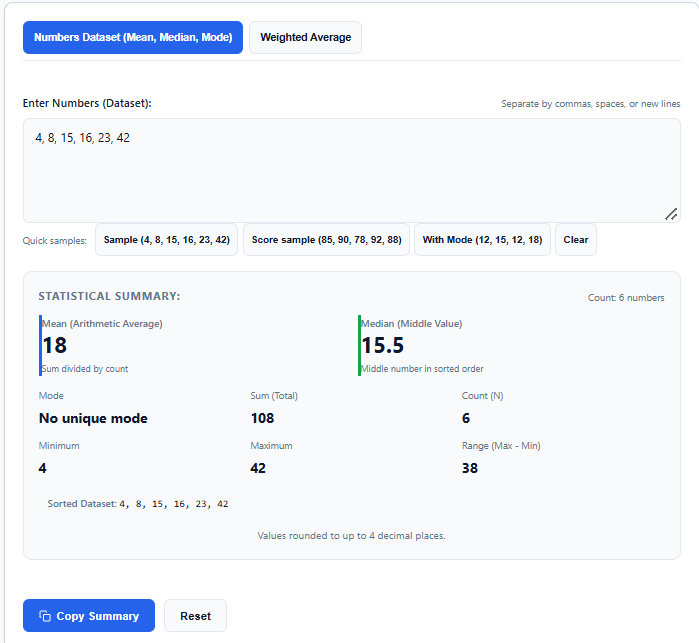
In the first tab, type or paste your numbers into the box labelled Enter Numbers (Dataset). Separate them with commas, spaces or new lines. There’s no submit button, so every card updates as you type.
Below the box, the Quick samples buttons load a ready list: Sample (4, 8, 15, 16, 23, 42), Score sample (85, 90, 78, 92, 88) and With Mode, which loads a list where one value repeats. Clear empties the box.
The Statistical Summary shows the Mean and the Median in two large cards. Smaller cards show the Mode, Sum, Count, Minimum, Maximum and Range. A Sorted Dataset line lists your numbers from smallest to largest, so you can check the median yourself. Results show up to 4 decimal places.
Copy Summary copies the full breakdown as text, and Reset restores the default list.
Reading the results: mean, median, mode and range
Take the default list 4, 8, 15, 16, 23, 42:
- Mean: 18. The sum is 108 and the count is 6. The mean uses every number, so one extreme value can pull it.
- Median: 15.5. With six numbers, the median is the average of the two middle values, (15 + 16) ÷ 2. An extreme value hardly moves it.
- Mode: no unique mode. Every number appears once.
- Range: 38. The maximum, 42, minus the minimum, 4.
In short, the mean is the balance point, the median is the middle position, and the mode is the most common value.
Mean vs median: when the average misleads
Take five monthly salaries in a small office: ₹30,000, ₹32,000, ₹35,000, ₹38,000 and the owner’s ₹5,00,000.
The mean is ₹1,27,000, which makes everyone sound rich. Four of the five earn less than ₹40,000. The median is ₹35,000, the middle salary, and it describes a typical employee far better.
When the mean and the median are far apart, trust the median. Salaries, house prices and monthly expenses with a few very large items are common cases.
The Weighted Average tab: when numbers count unequally
A simple average treats every number the same. A final exam worth 4 credits should count for more than a quiz worth 1.
Open the Weighted Average tab, where each row has a Value (x) and a Weight (w). Try the values 80, 75, 90 and 85 with the weights 3, 4, 2 and 3.
- Weighted sum: (80 × 3) + (75 × 4) + (90 × 2) + (85 × 3) = 240 + 300 + 180 + 255 = 975
- Total weight: 3 + 4 + 2 + 3 = 12
- Weighted average: 975 ÷ 12 = 81.25
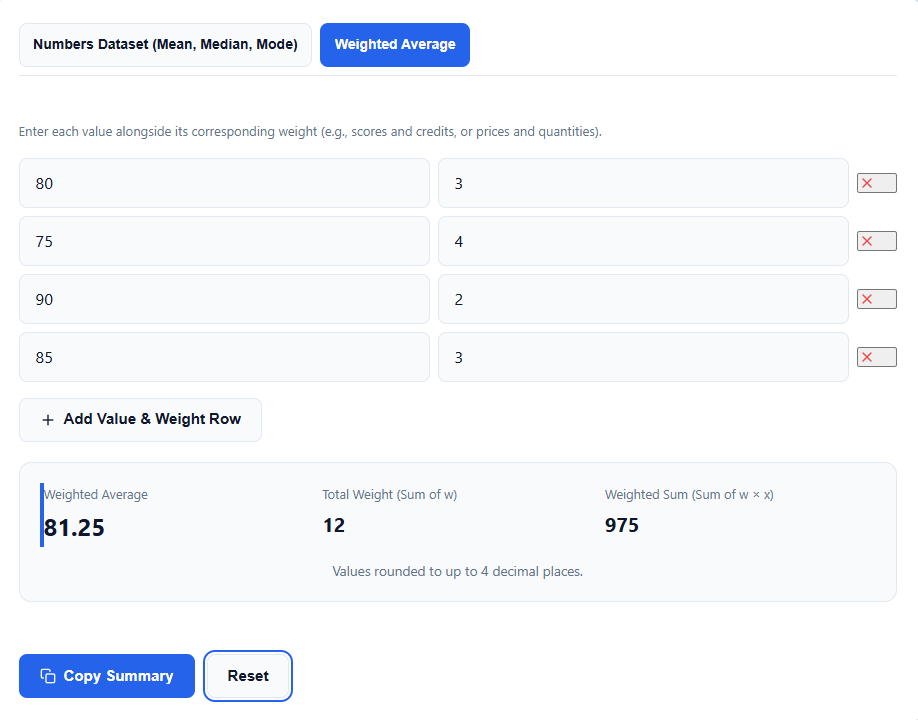
The simple average of the four values is 82.5. The weighted average is lower because the lowest score, 75, carries the heaviest weight.
Use Add Value & Weight Row for more rows, and the red cross to remove one. The tool shows the Weighted Average, the Total Weight and the Weighted Sum, so you can check the steps.
Three “averages” that people calculate wrongly
A batting average. In cricket, the average is the runs scored divided by the number of times the batter was dismissed, not by the number of innings. Say a batter scores 50, 30, 0 and 40 not out. The total is 120 runs, and there were 3 dismissals, so the average is 120 ÷ 3 = 40. The simple mean of the four scores is 30. Use the Sum card for the total, then divide by the dismissals yourself.
An average speed. Drive 60 km at 60 km/h and another 60 km at 40 km/h. The mean of 60 and 40 is 50, which is wrong. The first leg takes 1 hour and the second takes 1.5 hours, so you cover 120 km in 2.5 hours. That’s 120 ÷ 2.5 = 48 km/h. The same logic applies to mileage, and you can read more in the mileage and fuel cost guide.
An average of percentages. Say you scored 80% on a test out of 50 and 60% on a test out of 100. The simple mean is 70%, but you got 40 + 60 = 100 marks out of 150, which is 66.67%. In the Weighted Average tab, enter 80 with the weight 50 and 60 with the weight 100. The result is 66.6667. For a single set of marks, the marks percentage calculator is quicker.
A worked example: exam scores
Take five test scores: 85, 90, 78, 92 and 88.
- Sum = 433 and Count = 5, so the mean is 433 ÷ 5 = 86.6
- Sorted: 78, 85, 88, 90, 92, so the median is 88
- Every score appears once, so there’s no unique mode
- Range = 92 − 78 = 14
The mean and the median are close, which means the scores are fairly even with no extreme value. If your result is a CGPA, use the CGPA to percentage calculator.
Check the Count card before you trust the result
The Count card tells you how many numbers the calculator actually read. If you pasted 10 numbers and the Count shows 9, one entry wasn’t a valid number.
The calculator ignores words and symbols mixed into the list. It’s a quick way to clean a column pasted from a spreadsheet, but check the Count each time so a skipped value doesn’t change your average.
Frequently asked questions
When should I use the median instead of the mean?
Use the median when a few extreme values would distort the mean, such as salaries, house prices or expenses with a few very large items. If the mean and the median differ a lot, the median shows the typical value.
What does “no unique mode” mean?
It means no single value appears more often than the others. For example, every number may appear once. If two or more values tie for the highest count, the tool lists them together.
How do I calculate a weighted average?
Multiply each value by its weight, add the products and divide by the total weight. In the Weighted Average tab, enter each value with its weight, and the tool shows the weighted sum and the total weight.
What separators can I use between numbers?
Commas, spaces and line breaks all work, so you can paste a column straight from a spreadsheet.
Author: Kailash Choudhary
Kailash Choudhary runs Mubarak4u.in from Makrana, Rajasthan. He writes practical guides for the site, uses AI tools to help with drafts, and checks the figures before they go live.